What is "SKSG" ?
SKSG is a very simple image format.
(For detailed specifications of SKSG, please refer to the bottom of this page.)
SKSG is an acronym for "Sugoku Kantan-na Shiyou-no Gazou".
"Sugoku Kantan-na Shiyou-no Gazou" means "very simple specification image" in Japanese.
(For detailed specifications of SKSG, please refer to the bottom of this page.)
SKSG is an acronym for "Sugoku Kantan-na Shiyou-no Gazou".
"Sugoku Kantan-na Shiyou-no Gazou" means "very simple specification image" in Japanese.
Who created SKSG ?
hoku created it on June 12, 2024.
What are the features of SKSG ?
- SKSG has very simple specifications, making it suitable as a study subject for beginners in programming.
- SKSG has a small image size. Moreover, a single image can be managed by dividing it into separate files. This makes it possible to use the image itself as if it were embedded in a blockchain.
- SKSG also supports animation.
SKSG compression ratio
For very simple illustrations, the SKSG file size may be very small.


SKSG Specifications
Overall SGSK file structure
| Name | Required | Size | Description |
| SKSG Header (string) |
Yes | 4 bytes |
0x53 4B 53 47 *SKSG(ascii) |
| Mode (uint8) |
Yes | 1 byte |
0x01 = Image 0x02 = Animation (No loop) 0x03 = Animation (Repeated loop) 0x04 = Animation (Reciprocating loop) |
| Horizontal size (uint8) |
Yes | 1 byte |
Horizontal size of image. (1-256px) *Value +1
For example, if you want to make it 24px, write 0x17. (not 0x18)
|
| Vertical size (uint8) |
Yes | 1 byte |
Vertical size of image. (1-256px) *Value +1 |
| Ext Flags (uint8) |
Yes | 1 byte |
Specifies whether each extension information is held in flags. 0x01 : Use the Color extension. 0x02 : Use the Position extension. 0x80 : Use the Json extension. |
| Color extension (uint8 x 3 x 4) |
- | 12 bytes |
This section must be included only if "Ext Flags" is flagged 0x01. Color00 : R=1byte, G=1byte, B=1byte Color01 : R=1byte, G=1byte, B=1byte Color10 : R=1byte, G=1byte, B=1byte Color11 : R=1byte, G=1byte, B=1byte |
| Position extension ID (string) |
- | 8 bytes |
This section must be included only if "Ext Flags" is flagged 0x02. Put the identifier in 8 bytes. Only [0-9a-zA-Z_-] can be specified. Specify in ascii.
For example, it might be useful if you wanted to embed an image file directly into the blockchain.
By embedding an SKSG image file with the same ID in multiple transactions, it would be possible to identify the image as identical. The same wallet address issuing the transactions can be used to ensure identification. |
| Position extension Division Size (uint8) |
- | 1 byte |
This section must be included only if "Ext Flags" is flagged 0x02. Put the number of horizontal divisions, the number of vertical divisions, in 4 bits each of 1 byte. *value +1
For example, if you want to have 4 horizontal divisions and 3 vertical divisions, put 0x32. (not 0x43)
|
| Position extension Index (uint8) |
- | 1 byte |
This section must be included only if "Ext Flags" is flagged 0x02. Specify the Index of where this image is in the entire segmented image. The upper left corner is 0, and as you move to the right, 1, 2... and increasing. When you get to the right end, go down one line and start again from the left end. |
| Json extension size (uint16) *Big Endian |
- | 2 bytes |
This section must be included only if "Ext Flags" is flagged 0x80. Put the number of bytes of "Json extension". |
| Json extension | - | (Variable) |
This section must be included only if "Ext Flags" is flagged 0x80. The content should be embedded as a UTF-8 json string. If the data cannot be correctly parsed as json, ignore the value entered in this section. |
| Frames | Yes | (Variable) |
If Mode is Image, one Frame is included. If Mode is Animation, multiple frames are included. |
Frame Structure
| Name | Required | Size | Description |
| Frame size | - | 2 bytes |
This section must be included only if Mode is Animation. Put the number of bytes of "Frame".
For example, if Lines is 70 bytes, put 0x49. (not 0x46)
|
| Display time | - | 1 byte |
This section must be included only if Mode is Animation. Specifies how long to display the image for this frame, in 100 milliseconds. In other words, the maximum is 25.5 seconds. If this value is set to 0, the frame will be hidden and will not be drawn.
For example, if you want to draw for 200 milliseconds, put 0x02. (not 0xC8)
|
| Lines | Yes | (Variable) |
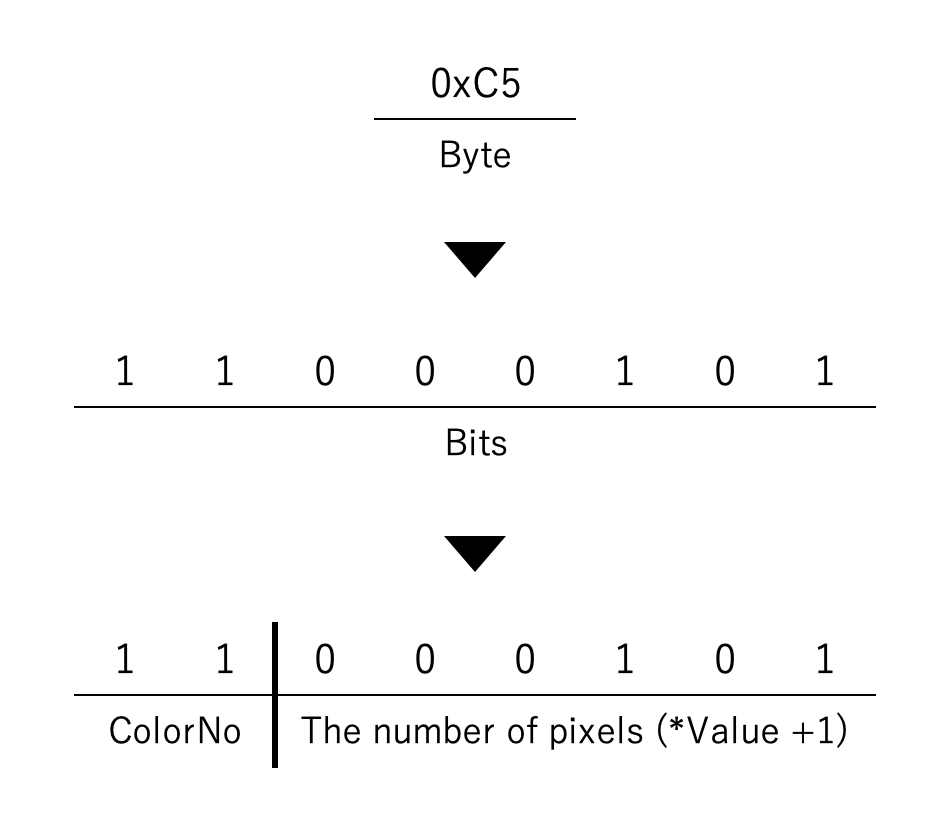
Each Line is 1 byte. The upper 2 bits of the Line contain the ColorNo. 00 = Color00 (default: #000000) 01 = Color01 (default: #555555) 10 = Color10 (default: #aaaaaa) 11 = Color11 (default: #ffffff) The lower 6 bits of Line contain the number of pixels of that color.(1-64) *value +1 Lines are inserted until the entire image is filled with pixels.
For example, if there are six consecutive pixels with Color11, the byte of the Line is 0xC5.
|
Example of actual byte array
The following image is an example. DL
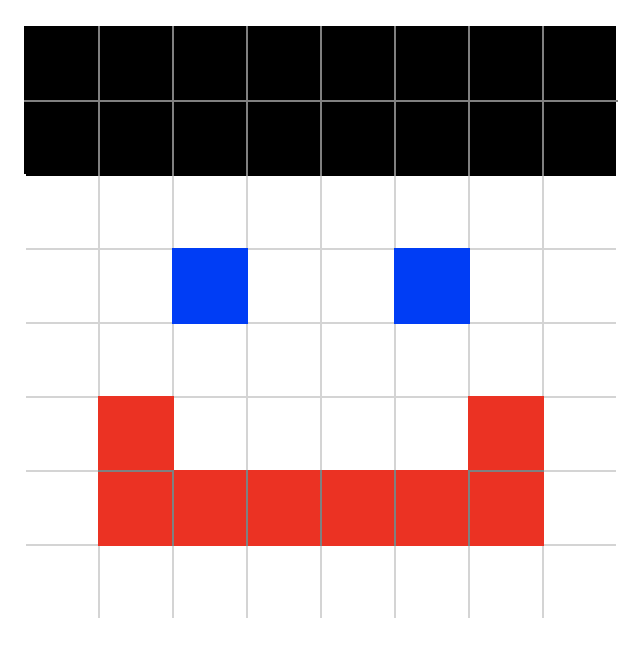
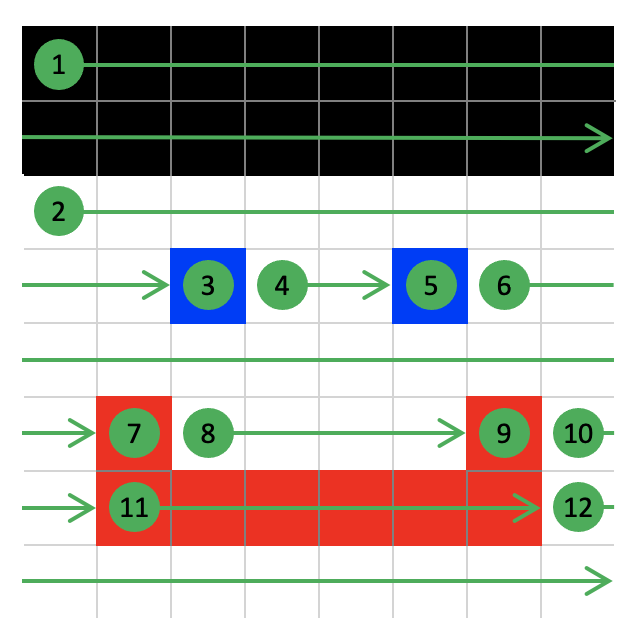
The Lines are like this. There are 12 lines.
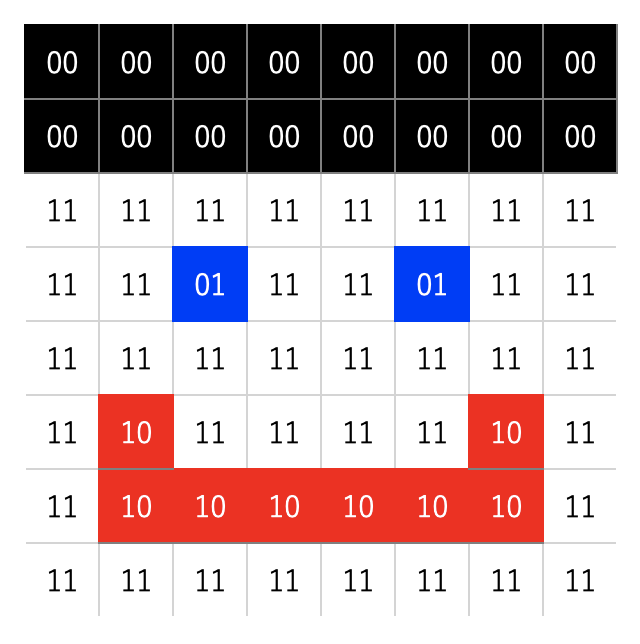
ColorNo looks like this.
In this case, the byte array looks like this.

This SKSG image is 32 bytes.
(Incidentally, if Color extentoin is not used, this image would be 20 bytes.)
The Lines are like this. There are 12 lines.
ColorNo looks like this.
In this case, the byte array looks like this.
This SKSG image is 32 bytes.
(Incidentally, if Color extentoin is not used, this image would be 20 bytes.)